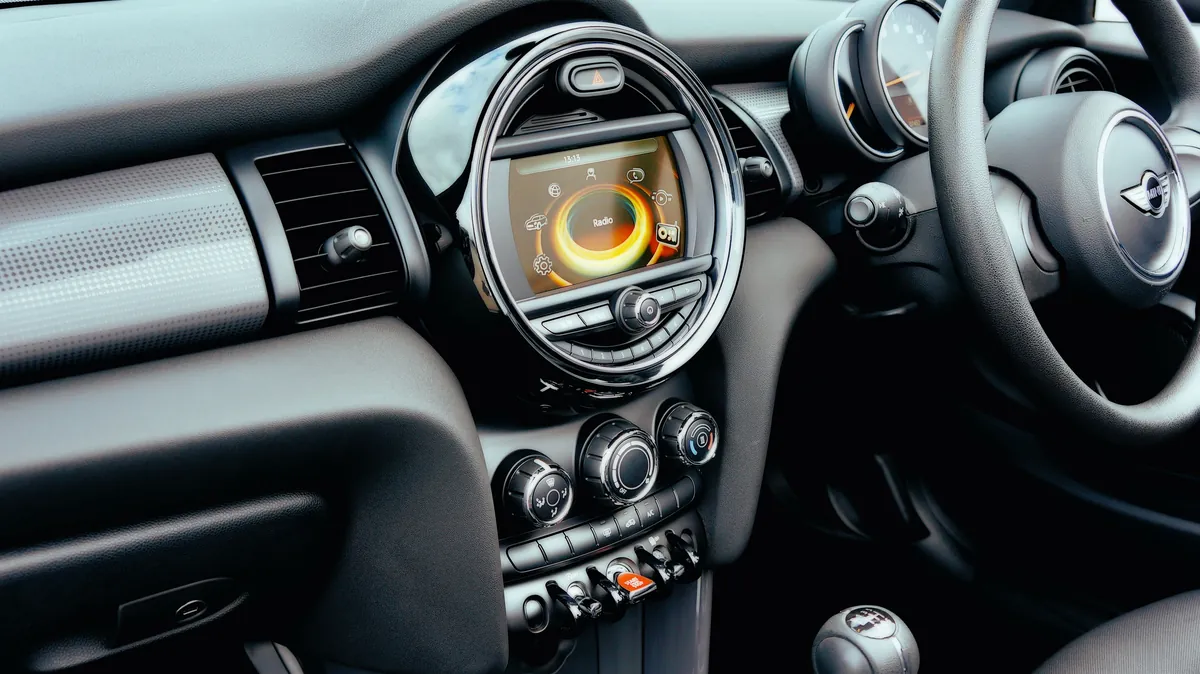
Set all four tyres to the pressure on the label in the driver's door pillar with the tyres cold, then tell the Mini you have done it, and let it finish the job on the move. Where that instruction lives depends entirely on the age of the car. On an R56 Mini Hatch it is a sequence of presses on the button in the turn indicator stalk. On an F56 it is "Perform reset" on the on-board monitor. On the Mini Cooper launched in 2024 it sits in the Apps menu under Vehicle status, and on standard tyres the car may not need a manual reset at all.
Mini uses BMW's two designs, and they behave differently. The Flat Tyre Monitor never measures pressure: Mini's handbooks describe it as detecting a pressure loss by comparing the rotational speeds of the individual wheels while the car is moving, because a tyre losing air gets smaller and therefore turns faster. The Tyre Pressure Monitor uses sensors in the tyre valves that measure the actual pressure, and on newer cars the tyre temperature too. One is initialised, the other is reset, and neither can do anything useful until the pressures themselves are right.
Every menu path and every step below is taken from Mini's own owner's manuals, with the model year of each edition named so you can check it against your car. One thing to expect: the archived manuals are published in US English, so they print the menu item as "Tire Pressure Monitor". This article uses the British spelling throughout, and the menu structure is the same either way, so match the position of the item rather than the letters. Mini keeps the archive of editions on its owner's manuals page.
Which tyre pressure system does your Mini have?
This is the first thing to settle, because the reset is not the same on the two systems and Mini fitted both across the same generations depending on specification. There is a quick test that needs no paperwork. Open the tyre pressure page on the display: if it shows a pressure reading for each individual tyre, you have the Tyre Pressure Monitor. If it only tells you whether the system is active, you have the Flat Tyre Monitor. Mini's handbooks describe exactly that difference, noting that the Tyre Pressure Monitor status screen additionally shows the current tyre inflation pressures, which are instantaneous readings that move with driving style and weather.
Where the reset lives, generation by generation, against the editions checked for this article:
| Generation | Roughly | Where the reset lives | Manual edition checked |
|---|---|---|---|
| R56 Hatch and R57 Convertible | 2006 to 2013 for the hatch | Button in the turn indicator stalk | Mini owner's manual, 2011 model year |
| R60 Countryman | 2010 to 2016 | Button in the turn indicator stalk | Mini Countryman owner's manual, 2012 model year |
| F55 and F56 Hatch | 2014 to 2024 | On-board monitor: "Vehicle info" on the 2017 edition, "My MINI" by the 2024 edition | Mini owner's manuals, 2017 and 2024 model years |
| F60 Countryman | 2017 to 2024 | On-board monitor: "My MINI" | Mini Countryman owner's manuals, 2017 and 2024 model years |
| F65 and F66 Cooper, U25 Countryman | 2024 onwards | Apps menu, then "Vehicle" and "Vehicle status" | Mini owner's manuals, 2025 model year, Cooper and Countryman |
Those are the editions read for this article. The Convertible has its own handbook in the same archive, and Mini published an edition for most model years in between, so the wording on your car can sit somewhere between two of the rows above. If your Mini is older than an R56, or the screens do not match what is described here, follow your own handbook rather than guessing at a menu. Our general explainer on what the TPMS warning light means covers the two designs in more depth.
What has to happen before you touch the reset?
Both Mini systems adopt whatever the tyres are set to as their reference. Reset with one tyre soft and you have simply taught the car that soft is normal, which is worse than leaving the light on. So the pressures come first, every time.
- Where the figures are. The 2024 Mini handbook says the pressure values can be found on the tyre pressure label on the driver's door pillar, and prints a full tyre pressure table by tyre size and maximum speed. TyreSafe likewise points drivers to the handbook, the fuel filler cap or the driver's door sill.
- Cold means cold. Mini defines it precisely: the car has covered no more than about 1.25 miles, or it has stood for at least two hours since the last trip. Tyres heat up as you drive and the pressure rises with them, so a forecourt reading after a motorway run flatters the tyre.
- Allow for the gauge. The same handbook warns that the displays on inflation devices may under-read by up to 2 psi. If a forecourt air line and your own gauge disagree slightly, that is why.
- How often. Mini asks for a check roughly twice a month and before a long trip, and notes that tyres lose pressure naturally and steadily, which is exactly the loss the Flat Tyre Monitor cannot see because it happens on all four wheels at once.
- Check the valve caps. Mini lists screwing every valve cap back on as a step of the check itself, which matters more than it sounds.
No figures are quoted here deliberately. They change with wheel size, tyre size and load, so take them from your own label.
How do you reset the light on an R56 Mini Hatch?
The R56 has no touchscreen involved. Everything happens through the button in the turn indicator stalk and the small display in the instrument cluster. The steps below are taken from the 2011 edition of the Mini owner's manual for the R56 and R57:
- Correct all four tyres cold, then start the engine but do not drive off.
- Press the button in the turn indicator stalk repeatedly until "SET/INFO" is displayed.
- Press and hold the button until the display changes.
- Press the button repeatedly until the corresponding symbol and "RESET" are displayed.
- Press and hold the button until the display changes.
- Drive off. The manual is blunt that initialisation is completed while the car is on the move, without any feedback, and that you can interrupt the drive and it will carry on automatically when you set off again.
If your R56 has the sensor-based Tyre Pressure Monitor instead, the stalk gets you there the same way, but you keep pressing until the tyre pressure symbol and "ACTIVE" are displayed, choose "RESET", then press and hold until "RESETTING" appears before driving off. The 2011 manual adds a detail the Flat Tyre Monitor does not give you: after a few minutes of driving the set pressures are accepted as the target values, and the indicator lamp goes out once the reset is finished.
Two R56 limits catch people out. Mini says not to initialise the system with snow chains fitted, because the instrument may then read incorrectly, and it states that the Flat Tyre Monitor cannot function at all while the space-saver spare is on the car. It also warns the system can be delayed or misbehave on snowy or slippery surfaces and under a performance-oriented driving style with wheelspin or high lateral acceleration. On the R56, a genuine flat is signalled by yellow and red warning lamps together with an audible signal, which is a harder warning than the single yellow lamp used on later cars.
How do you reset the light on an F56 Mini (2014 to 2024)?
From the F56 onwards the reset moved onto the screen, and the wording changed partway through the car's life. The 2017 edition of the F55 and F56 owner's manual gives the path as "Vehicle info", then "Vehicle status". By the 2024 edition the first item is "My MINI". Exactly which model year the name changed is not something we can pin down from those two editions, so look for whichever of the two your car shows. After that the steps are identical:
- Open "My MINI" (or "Vehicle info" on early software) on the central display.
- Select "Vehicle status".
- Select "Tyre Pressure Monitor", or "Flat Tyre Monitor" if that is the system your car has.
- Start the engine but do not drive off.
- Select "Perform reset".
- Drive off.
What you see next is the useful part, because the F56 tells you where it has got to. The wheels on the display turn grey and the 2024 manual says "Resetting Tyre Pressure Monitor..." is shown. After a travel time of several minutes the set pressures are accepted as reference values, the wheels turn green, and the car displays "Tyre Pressure Monitor active. See label for recommended pressures." The 2017 manual puts a number on the trigger: the pressures are accepted after driving faster than 19 mph for a short period. You can break the journey at any point and the reset picks up where it left off.
The Flat Tyre Monitor version of the same menu behaves as it did on the R56: you confirm the pressures with "Perform reset", drive off, and the initialisation completes silently on the move with no confirmation message. Mini again says not to initialise it with snow chains fitted.
On an F56 the colour of the wheels on the screen is the quickest health check you have. All green means the system is live and warning against the pressures stored at the last reset. Grey means it cannot identify pressure losses, either because of a malfunction or because a reset is still running.
How does the reset work on the Mini Cooper launched in 2024?
The current car, the F65 and F66 Cooper, with the round central screen Mini calls the Interaction Unit, works on a different principle again, and this is where most guidance written for older Minis goes wrong. The 2025 edition of the Mini owner's manual describes a Tyre Pressure Monitor that compares the current pressures against nominal, or target, pressures for the tyres it has detected or that you have entered. Those target pressures already allow for the effect of driving and outside temperature on the tyre, so the figure on screen can differ from the one on the door pillar label.
The consequence is that on ordinary tyres there is no reset button to hunt for. Mini says the system detects and updates the mounted tyres after a wheel or tyre change once you have driven for a short time, and that it does not activate until you have been driving for a few minutes afterwards. The status screen is at Apps menu, then "Vehicle", "Vehicle status", "Tyre Pressure Monitor".
A manual reset is reserved for tyres outside the car's own tyre pressure specification, which the manual calls tyres with special approval. In that case:
- Go to Apps menu, then "Vehicle", "Vehicle status", "Tyre Pressure Monitor".
- Make sure the tyre settings are correct.
- Turn on drive-ready state but do not drive off.
- Select "Perform reset".
- Drive off. The wheels show grey while the reset runs, then green once the set pressures have been taken as the stored values after several minutes of driving.
If the car has not recognised your tyres, the settings live one level deeper, at "Tyre settings", "Tyre selection", "Manual", "Tyre type", where you choose the tyre size for the rear axle and the maximum speed you intend to drive, then save. Mini attaches a warning to that screen worth repeating: incorrect entries lead to incorrect target pressures, and then the car cannot reliably tell you about a pressure loss. If you have just had a different size or an unusual tyre fitted, check that screen rather than assume.
Where the current car still has the Flat Tyre Monitor, it is initialised at Apps menu, "Vehicle", "Vehicle status", "Flat Tyre Monitor", with drive-ready state on but the car stationary, then "Perform reset" and drive off. Mini lists two triggers for that initialisation: after the tyre pressure has been adjusted, and after a tyre or wheel change.
Where does the Countryman differ?
Mostly it does not, and then suddenly it does. Three points are worth knowing before you follow hatch instructions on a Countryman.
- R60 Countryman, 2010 to 2016. The reset is the same stalk sequence as the R56, printed in the same words in the 2012 Countryman manual. The real difference is elsewhere in that handbook: Mini recommends fitting run-flat tyres when new tyres go on or when you change between summer and winter sets, and says plainly that no space-saver spare is available in the event of a flat.
- F60 Countryman, 2017 to 2024. The 2017 F60 manual already used "My MINI" then "Vehicle status", in the same model year that the F56 manual was still saying "Vehicle info". So the menu root can differ between a hatch and a Countryman of the same age, and following hatch instructions will leave you hunting for a menu that is not there. The 2024 F60 manual still says "My MINI". The plug-in hybrid Countryman has its own separate handbook.
- U25 Countryman, 2024 onwards. It follows the new car. The 2025 Countryman manual prints the same path, Apps menu, "Vehicle", "Vehicle status", "Tyre Pressure Monitor", with target pressures, tyre settings and a reset reserved for tyres with special approval. Note the wording of the step before the reset on both the current Cooper and the current Countryman: turn on drive-ready state but do not drive off, rather than start the engine.
The practical point for a Countryman on bigger wheels is that the same job takes the same steps, but a big alloy on a low-profile tyre punishes a pothole harder. If the light came on straight after an impact rather than as a slow drift, look at the rim and the tyre sidewall for damage as well.
Why has my Mini got run-flats and no spare wheel?
Because Mini designed it that way, and it changes what you should do when the light comes on. Run-flats have reinforced sidewalls that support the car for a limited distance with little or no pressure, and Mini's manuals identify them by a circular symbol containing the letters RSC on the tyre sidewall.
What the handbooks actually allow is narrower than most drivers assume:
- Do not exceed 50 mph with a damaged run-flat, avoid sudden braking and steering, and check the pressure in all four tyres at the next opportunity.
- With an average load and favourable conditions the possible distance is up to about 50 miles. Mini is clear that this varies with speed, load, road surface and temperature, so treat it as a ceiling, not a plan.
- If the car is on normal tyres rather than run-flats, Mini says do not continue driving at all.
- Vibration or loud noises mean the tyre is failing. Reduce speed, stop and do not carry on.
- Sealant from the tyre repair kit may damage the wheel electronics, and Mini says to have them checked and replaced if needed at the next opportunity. That is a real cost of using the can rather than calling someone out, and we cover it in is tyre sealant any good.
A run-flat that has been driven on flat is usually finished even if it looks intact, because the sidewall has done work it was never meant to do repeatedly. Our guide to run-flat tyres explains what can and cannot be repaired.
One rule overrides all of it. Do not carry out any of this on a motorway hard shoulder, in a refuge or in an emergency area. If the car can still be driven safely, leave at the next junction or reach services and check it there; if not, stop on the hard shoulder or in an emergency area and wait behind the barrier. 999 is for anyone in immediate danger; for help on a motorway or major A road in England, National Highways is on 0300 123 5000.
Why is the Mini tyre pressure light still on after a reset?
Start with what the lamp is doing, because Mini's manuals separate the two behaviours carefully and they mean different things.
| What the lamp does | What Mini's manual says it means | What to do |
|---|---|---|
| Yellow lamp on steadily, Tyre Pressure Monitor | A flat tyre or pressure loss, with a Check Control message naming the tyre | Check all four cold, correct them, reset |
| Yellow lamp on steadily, Flat Tyre Monitor | A flat tyre or pressure loss | Reduce speed and stop cautiously, avoiding sudden braking and steering |
| Lamp flashes, then stays on | Flat tyres or pressure losses cannot be detected at all | Work through the causes below |
| Yellow and red lamps with an audible signal (R56 and R60) | A flat tyre or substantial loss of pressure | Stop safely and inspect before driving on |
For the flashing case, the 2024 and 2025 manuals list the causes in order: interference from other systems or devices on the same radio frequency, in which case the system becomes active again once you leave the area; a reset the Tyre Pressure Monitor could not complete, so reset it again, which the 2025 manual attaches specifically to tyres with special approval; a wheel fitted without wheel electronics, which needs checking; or a malfunction.
If the lamp is steady and came back within days of a proper reset, the system is almost certainly right and the tyre is still losing air. A nail or screw in the tread, a corroded or leaking valve or a poor seal at the rim all produce exactly that pattern. Treat it as a slow puncture and have it found, as covered in slow puncture causes and fixes. Cold weather is the other common trigger, since pressure falls as temperature drops, which is why the light often appears on the first properly cold morning of the year.
If a sensor itself has failed, no amount of resetting will help and the sensor has to be replaced and matched to the car. There is an MOT consequence as well: the DVSA MOT inspection manual lists a tyre pressure monitoring system that is malfunctioning or obviously not working as a major defect, and the TPMS inspection applies to cars first used on or after 1 January 2012, which takes in every F56, F60, F65, F66 and U25 as well as the late R56 and R60. The same manual is careful to say that a lamp staying on because the system has identified a previous pressure loss does not automatically mean the system has a malfunction, and that an obviously under-inflated tyre is a separate minor defect in its own right.
When should you call a mobile fitter out to a Mini?
Reset the light yourself when the pressures were simply low and everything else looks normal. Get someone out instead if:
- the light is back on within days, even after a proper cold-pressure check and reset
- one tyre keeps going down, or you can see a nail, a cut or a bulge in the sidewall
- the lamp flashes before it settles, or stays on after a tyre or wheel change
- the tyre is a run-flat that has been driven on with little or no pressure
- the tyre is too soft to drive on safely, and there is no spare in the boot
Rescue Tyres works from one base at Brent Cross, NW2, and fits tyres where the Mini is parked across London and the Home Counties; if you are further out, ask on the call whether and when we can reach you. We check all four pressures cold against the label on your Mini's door pillar, look over the tread, sidewalls and valve caps, and offer puncture repairs to BS AU 159 when the hole sits inside the repairable zone of the tread. A run-flat that has been driven on while flat, or damage outside that zone, means a new tyre of the same size and type, sourced for the job and fitted and balanced at the car. A dead valve sensor is not a tyre problem, and if that is what we find, that is what we tell you.
Tell us the size printed on the sidewall, and whether it carries the RSC run-flat marking, and we will agree the price with you before anything is fitted and give an arrival time on the call.
